How the components work together
The platform has two flows: a lifecycle flow, in which policies are built and delivered, and a runtime flow, in which access requests are decided.
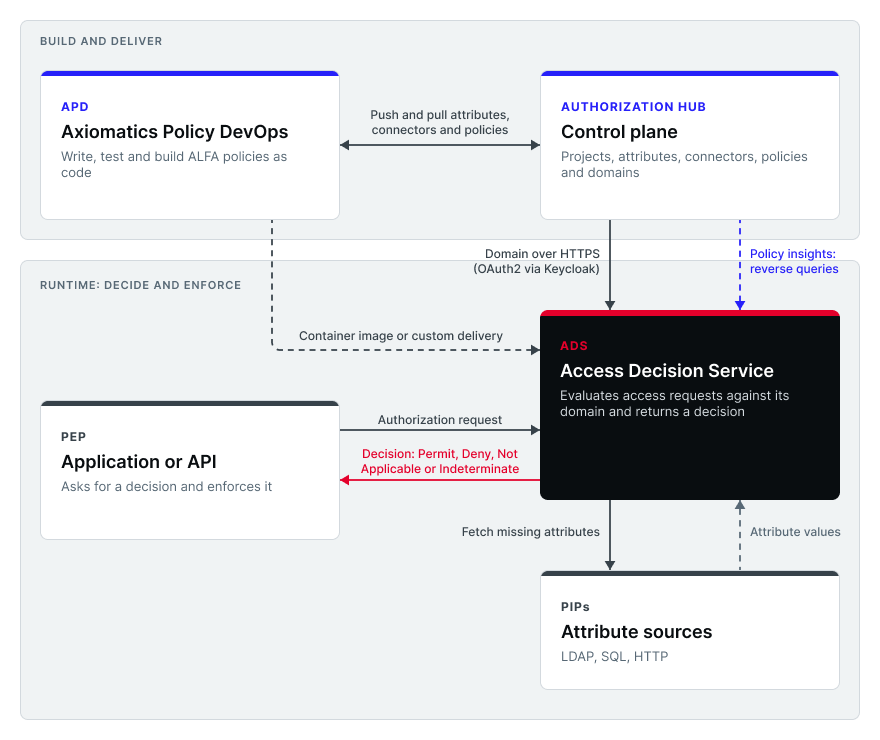
Lifecycle flow
-
Author
- Developers write ALFA policies and attribute connectors in APD, with tests.
- Policy admins author directly in Authorization Hub's editor and dictionary.
-
Verify
APD runs the tests and can run the domain on a local ADS. Because policies are code in git, changes go through review and CI like any other software.
-
Store
APD pushes the dictionary, attribute connectors and policies to a project in Authorization Hub, where they appear in the editor and UI, and can pull them back. Changes that arrive in Authorization Hub, whether pushed by APD or made in the UI, follow the same draft workflow: they are staged as drafts and take effect once they are promoted. Pushes and pulls overwrite rather than merge, so decide per project whether git or Authorization Hub is the source of truth.
-
Create the domain
Create or update a domain in Authorization Hub from the project's policies, attributes, and attribute connectors. Each change is stored as a new version that you can roll back. Alternatively, APD can store the domain it built directly in Authorization Hub. Either way, a domain is identified by project and domain name, and ADS can fetch it.
-
Deliver to ADS
ADS gets the domain in one of three ways.
Choosing how the domain reaches ADS
| Method | How updates reach ADS | Best for |
|---|---|---|
| Authorization Hub integration | APD pushes to Authorization Hub - ADS is configured to fetch the domain from Authorization Hub and, if refresh is enabled, polls for changes | Teams using Authorization Hub as their control plane - policy changes without redeploying |
| Container image | APD stages the build context - your pipeline builds and pushes an image with the domain baked in | Kubernetes or air-gapped setups that want immutable, versioned artifacts and easy rollback |
| Custom integration | APD builds the domain - your own Gradle task or pipeline step delivers it (for example over SCP, to Kubernetes or through a REST call) | Existing delivery mechanisms - updates without image rebuilds |
These can be combined: for example, Authorization Hub for dev and test environments, and image-based deployment for production.
Staging an image compiles and builds the domain but does not run the tests. Make the tests a pipeline step before the image is built, so untested policies are never baked in.
How ADS gets its domain from Authorization Hub
When ADS is connected to Authorization Hub, it retrieves its domain over HTTP(S), typically HTTPS. If refresh is enabled, ADS also polls for changes and loads a newly created or updated domain without a restart. Requests already in progress finish on the previous version, and new requests use the new one.
This is what makes Authorization Hub the single place where policy changes take effect: update the domain once, and every connected ADS instance with refresh enabled picks up the change. The setup steps are covered in the ADS and Authorization Hub documentation.
Runtime flow
- A user or service attempts an action in an application.
- The PEP sends an authorization request to ADS.
- ADS evaluates the domain's policies, calling attribute connectors (the PIPs) for any attribute the request did not carry.
- ADS returns Permit, Deny, Not Applicable, or Indeterminate.
- The PEP enforces it.
Authorization Hub is not in this path. Once ADS has its domain, decisions do not depend on Authorization Hub being reachable, so enforcement stays fast and resilient.
Review loop: Policy insights
Authorization Hub closes the loop with Policy insights. A reviewer runs a report from a template that the team has defined, and Authorization Hub sends a query to a configured ADS endpoint that has reverse queries (CAQ) enabled. The result shows what a given user can access, or who can access a given resource, without anyone reading the policies. Authorization Hub reaches these ADS endpoints through connections that administrators configure centrally.
Who does what
| If you want to... | Use |
|---|---|
| Define attributes, connectors and policies with a UI and shared governance | Authorization Hub |
| Test and debug policies, build CI/CD pipelines, keep policies in git | APD |
| Serve authorization decisions to applications | ADS |
| Answer "who can access what?" for audits and reviews | Authorization Hub Policy insights (backed by ADS CAQ) |