ADM integration
ADM is Axiomatics' content management system for authorization domains, which include policies, attributes, and attribute connectors. It stores policies and configurations that Axiomatics Decision Service (ADS) retrieves for policy evaluation. ADS is Axiomatics' Policy Decision Point (PDP) and integrating with ADM allows you to push, pull, run, test, and promote authorization domains.
In ADM, an authorization domain is identified by a namespace and a domain name.
To connect to an ADM domain, add an adm block within the repositories section in your build.gradle file.
alfa {
 namespace 'JanesNamespace'
    repositories {
        adm {
            environment 'Dev'
            host 'https://adm.dev.myorg'
            domainName 'JanesDev'
            envVariable 'LDAP_PIP_URL', 'http://ldap-dev.myorg.com'
            oidcCredentials {
                client_id 'ads'
                client_secret 'uU12JImeEiA1cfC0q2aNi40DhNkjeK1Ga'
            }
        }
    }
}
| Property | Description |
|---|---|
environment | A string that provides a free-form description of the environment or nature of the domain. Examples include dev, qa, or prod. This string is used to create Gradle tasks related to the ADM domain integration. |
host | Protocol and hostname of ADM. |
domainName | The domain name in ADM. |
envVariable | Optional property. Sets environment variable if you run this domain with ADS from within Axiomatics Policy DevOps. Multiple envVariables properties are possible. |
client_id | The client ID to use for OIDC authentication to ADM. |
client_secret | The client secret to use for OIDC authentication to ADM. |
The ADM namespace is set globally in the alfa{} section and will be the same for all adm repository entries.
If your ADM instance uses basic authentication instead of OpenID Connect (OIDC), replace the oidcCredentials block with a basic credentials block:
basicCredentials {
    username  'user'
    password  'password'
}
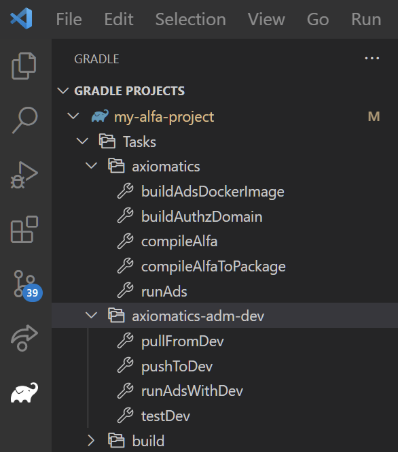
Adding an ADM repository generates a new Gradle task group with related tasks. The screenshot below shows the result after adding an ADM repository with the environment name "Dev" to build.gradle. The task group axiomatics-adm-dev is created, containing four tasks: pullFromDev, pushToDev, runAdsWithDev, and testDev.
Certificates
Any certificates required for TLS communication with ADM or ADS should be added to the appropriate truststore (for example, the operating system's truststore or Java's truststore). Alternatively, you can specify a custom truststore (JKS or PKCS12 format) using standard Java system properties.
# Restart Gradle deamon (../gradlew --stop) after changing these lines, otherwise changes may not be loaded
systemProp.javax.net.ssl.trustStore=mycacerts.jks
systemProp.javax.net.ssl.trustStorePassword=changeit
systemProp.javax.net.ssl.trustStoreType=JKS
or
./gradlew -Djavax.net.ssl.truststore=mycacerts.jks
...
You should restart the Gradle daemon using ./gradlew --stop to apply any changes.
Tasks
pullFromDevDownloads the
domain.yamlfile from ADM and stores it tobuild\alfa\axiomatics-adm-dev\domain.yaml.pullFromDev output> Task :pullFromDev
Domain https://adm.dev.myorg/adm/api/namespaces/JanesNamespace/names/JanesDev/domain stored to build\alfa\axiomatics-adm-dev\domain.yamlpushToDevUploads the domain generated by the
:buildAuthzDomaintask (the local domain located insrc/) to ADM.ImportantThis action pushes the domain as the latest version. Any ADS instances polling this domain will receive the update.
To avoid pushing the local source domain (for example, in a promote scenario), read the "Copy domains between multiple ADS instances" section below.
pushToDev output> Task :pushToDev
Source file is build\alfa\domain\ads\domain.yaml
Domain successfully pushed to https://adm.dev.myorg/adm/api/namespaces/JanesNamespace/names/JanesDev. Server returned new id 087f5c4a-bba2-4cb9-94a3-b9a557d005e0To execute tests, invoke them explicitly before pushing. For example:
./gradlew test pushToDevrunAdsWithDevStarts a local ADS instance with the domain, using a random, unencrypted local HTTP port and basic authentication (username:
pdp-user, password:secret).noteYou can add environment variables using
envVariable 'KEY', 'VALUE'within theadmblock.runAdsWithDev output> Task :spawnAdsWithDev
Location of domain.yaml is https://adm.dev.myorg/adm/api/namespaces/JanesNamespace/names/JanesDev/domain
> Task :runAdsWithDev
ADS is running on port 52870. To see ADS output run gradle with --info. Stop it with Ctrl-C!tipTo start ADS with DEBUG level logging enabled, use the
--infoswitch.testDevRuns the system tests on the domain and stores the test report in the
build/reports/tests/testDevdirectory.testDev output> Task :spawnAdsWithDev
Location of domain.yaml is https://adm.dev.myorg/adm/api/namespaces/JanesNamespace/names/JanesDev/domain
> Task :testDev
...test resultsnoteEnsure that the
mainpolicyis set within thealfasection of yourbuild.gradlefile in order to identify system tests.