Dictionary
In the context of policy authoring, attributes serve as the fundamental building blocks for defining and enforcing authorization policies, dictating who can access which resources and under what specific circumstances.
The Dictionary serves as a centralized repository of attributes, a common vocabulary used to describe authorization policies. Within the dictionary, you can define and organize attributes needed to express your authorization policies.
All of your attributes are contained in the auto-generated attribute-dictionary.alfa file. This file gets populated automatically the time you open the Policies section with the attributes existing at this moment in the Dictionary. When you save your policy, this attribute dictionary "snapshot" is saved along with the other ALFA resources.
This saving action only occurs when you click Save all, not just Save.
Interface
Upon accessing the Dictionary, you are presented with a comprehensive list of all existing attributes. This interface consists of the following key information about the attributes included in the dictionary:
| Description | |
|---|---|
| Name | The user-friendly name of an attribute, serving as a readily identifiable label for its purpose and usage. For instance, "role" is a common attribute name used to represent a user's assigned position within an organization. |
| Description | A brief overview of the attribute's purpose or scope. |
| Namespace | A hierarchical structure used to organize attributes into logical groups. It consists of a sequence of one or more case-sensitive strings delimited by dots (.). Namespaces can be nested within one another, following the standard dot-notation conventions found in languages such as Java and C#.INFO: Namespaces define the scope for your attributes, providing each with a unique identifier. Attributes are accessed using their Fully Qualified Name (FQN), which is constructed by joining the namespace and the attribute name with a dot ( .). |
| Data type | The specific type of data an attribute holds, such as string, integer, or boolean. |
| Category | A property that provides additional context and classification information such as subject, action, resource, or environment. |
| Cache profile | The cache profile applied along with the specified Time to live and Max items values. Read the Cache configuration section for details. |
| Updated by | The Authorization Hub user or M2M client that updated the attribute last. |
| Last updated | The date and time of the last update performed on the attribute's properties. |
| Attribute connectors | See "Attribute mapping" below for details. |
Additionally, the following features are available in this section to help you manage your attributes effectively:
-
Filter: Use the filter field to refine the list and narrow down the displayed attributes in your dictionary. You can enter an attribute name, part of a description, or a category.
noteThis is a dynamic field and returns relevant results as you type.
You can further narrow down your filter by selecting one or more namespaces from the Namespaces dropdown.
-
Sorting: Sort the contents of the list by column values by clicking the header of the column whose contents you want to sort by.
tipYou can see the applied direction on the header's arrow indicator.
-
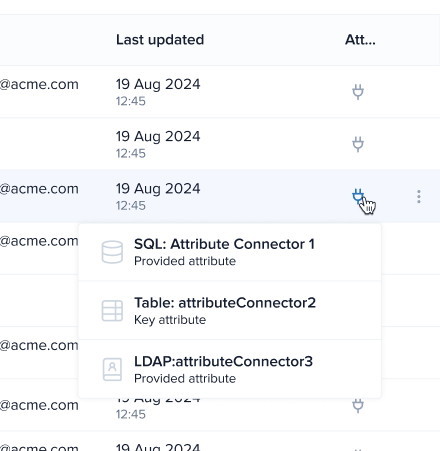
Attribute mapping: The attribute mapping icon in the Attribute connectors column lists all attribute connectors having that specific attribute provided to the authorization engine in order to retrieve the corresponding values from the attribute source.
noteA single attribute can be mapped by multiple attribute connectors.
Manage attributes
You can perform several actions to your existing attributes by clicking the three dots on the far right of each entry and selecting from:
-
Edit
-
Perform all necessary changes in the displayed pop-up window.
-
Click Update.
-
-
Duplicate
A clone of the attribute is created with the prefix
Copy_of_added to its name. -
Delete
Confirm your action in the displayed pop-up by clicking Yes, delete.
IMPORTANTThis action is permanent and cannot be undone.
Default attributes
The Dictionary comes preloaded with commonly used attributes categorized under Subject, Resource, Action, and Environment. This selection helps you start authoring policies quickly and serves as a guide for how the attribute dictionary should be populated.
The default attributes are included with every deployment and are also accessible through the attribute-dictionary.alfa file.
All default attributes, except for the three environment attributes, can be edited or deleted allowing you to tailor the dictionary to your specific needs. The three environment attributes (current_time, current_date, and current_dateTime) represent the current time, date, and date-time captured by the Policy Decision Point (PDP) during policy evaluation. Their correct functioning is fundamental for reliable evaluation of time-based policies and therefore, they cannot be edited or deleted.
API reference
The Authorization Hub REST API interactive documentation is available in the Swagger UI API. You can access the API schemas and endpoint definitions for the dictionary service using the following URL:
http(s)://<authorization-hub-url>/api/hub-service/swagger-ui/index.html