Authorization domain file analysis
This section provides a detailed breakdown of the domain configuration file. Written in YAML format, this file can be created or modified using any standard text editor. For more information on YAML syntax, visit yaml.orgOpens in a new tab.
Two authorization domain file versions are currently supported: 2.1 and 2.0. The differences between them are limited to the Attribute connectors section. Currently, only the following Axiomatics component versions support version 2.1 of the authorization domain:
| Component | Version |
|---|---|
| Access Decision Service (ADS) | 2.2.0 |
| Table Attribute Connector | 7.2.0 |
| SQL attribute connector | 6.4.0 |
| LDAP attribute connector | 6.4.0 |
| HTTP attribute connector | 5.5.0 |
| Parser attribute connectors | 1.1.0 |
The components listed above are compatible with both authorization domain versions 2.0 and 2.1.
The examples below focus on specific segments of the configuration. For a full-scale perspective, refer to the Sample domain section.
Identity section
The Identity section uniquely identifies the domain through the identity property. This property accepts a single, case-sensitive string that must adhere to the following constraints:
Allowed Characters: Alphanumeric characters (
a-z,A-Z,0-9), underscores (_), hyphens (-), and periods (.).No Whitespace: The string cannot contain spaces.
This identifier is essential for versioning and lifecycle management. When logging is enabled, the identity is recorded in the audit log as the groupId.
It is recommended updating the identity string whenever the domain configuration is modified.
Example:
identity: domain_identification_1234
Identity section example
Metadata section
This is an optional section for storing metadata used for tooling and domain management workflow processes. This section can have any number of sub-properties as shown in the example below.
Example:
metadata:   ## Marks the start of the metadata section of the domain configuration file.
    status: published
    approvedBy: Bob
## each metadata entry is in the format <Metadata key>: <Metadata value>
Metadata section example
Metadata properties
Below is a list of the components that the metadata sub-properties consist of:
| Component | Example | Notes |
|---|---|---|
<Metadata key> | status, approvedBy | The key must be a string only containing alphabetic characters (a-z, A-Z), digits (0-9), underscores (_), hyphens (-), and periods (.). |
<Metadata value> | under-development, in-review | The value can be any string. |
The metadata could be used, for example, to indicate the status of the domain (under-development, in-review, published), or the sensitivity of the document (public, secret, top-secret).
Policy section
This section contains the authorization policies, expressed as a list of XACML policies and/or policy sets.
You can create or edit entries in this section using any software tool capable of producing XACML 3.0 compliant policies, including standard text editors. For an optimized experience, Axiomatics provides the following specialized tools:
- The Policy Editor of Axiomatics Services Manager (ASM)
- The Axiomatics Language for Authorization (ALFA) plugin and compiler.
The policies are defined under the policy property and include the sub-properties listed below.
Policy properties
Below is a list of the sub-properties that define the policy section:
| Property | Description |
|---|---|
policy | Marks the start of the policy section of the domain configuration file. |
mainPolicyId | Contains the ID of the policy or policy set in the subsequent list of policies that serves as the main policy. A designated main policy (or root policy) is required to act as the entry point for the evaluation process. If you are using specialized editing tools, such as those provided by Axiomatics, these IDs may be generated automatically. Regardless of the creation method, every policy must have a unique ID. To change the main policy, update this field with the ID of the desired policy or policy set. |
xacmlSpecifications | Contains the actual policy specifications in a list format. To add an entry, use the YAML block scalar indicator (- |) followed by the XML-formatted policy or policy set. |
When adding policy specifications, make sure you strictly adhere to YAML indentation rules for lists. Include one list entry per policy or policy set. Repeat for as many policies as required. The policies do not have to be entered in a particular order.
The following example illustrates a YAML policy section containing a mainPolicyId and an embedded XACML policy specification. The XACML policy is defined as a string within the YAML file and specifies a rule that grants access to users with the manager role.
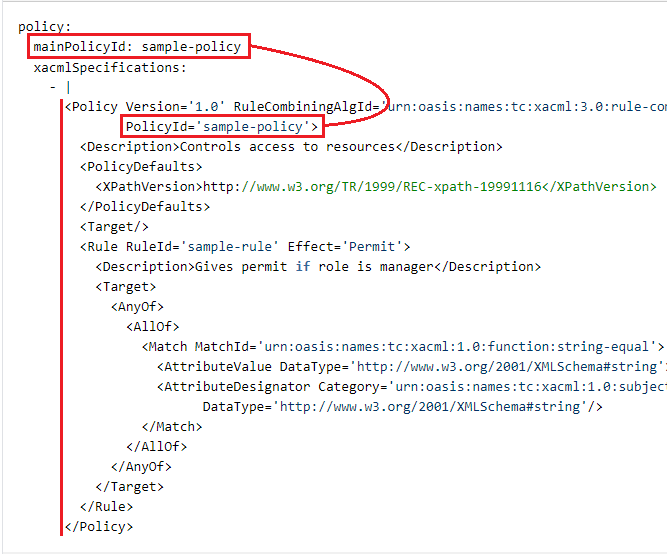
Policy section example (detail)
Policy content can only be specified as in-line text. References using URIs/URLs are not allowed. Only XACML 3.0 format is supported.
Attributes section
An attribute is uniquely identified by a string known as an attribute identifier. Each identifier must be associated with a XACML quadruple, which consists of the XACML identifier, category, data type, and issuer. Read more in the Attribute properties section below.
This mapping aligns with how XACML defines attributes and is required for compatibility with internal components that cannot handle attribute identifiers.
Duplicate attribute identifiers are not allowed within the attributes section, nor can there be duplicate XACML quadruples.
Example:
attributes:     ## Marks the start of the attributes section of the domain configuration file.
    user.role:      ## Attribute identifier
      xacmlId: user.role
      category: AccessSubject
      datatype: string
      issuer: Acme Inc.
    user.resourceId:    ## Attribute identifier
      xacmlId: user.resourceId
      category: Resource
      datatype: http://www.w3.org/2001/XMLSchema#string
      issuer: Acme Inc.
Attributes section example
Attribute identifiers
An attribute identifier is a short and simple name for the attribute, like for example: role, _documentStatus, attributes.resourceType.
It should be in the form of a single, case-sensitive string that adheres to the following constraints:
only alphanumeric characters (
a-z,A-Z,0-9) and underscores (_) are allowed.segments are separated by periods (
.).no segment can start with a digit (
0-9), neither can an individual segment or the whole identifier be a single underscoreno segment nor the whole identifier may use the reserved words listed in the table below:
Reserved words advice bag function namespace policyset allowbags category id obligation rule and clause import on ruleCombinator anyAtomic comm infix or target anyAtomicOrBag condition inv permit true apply deny issuer policy type attribute false mustbepresent policyCombinator
Attribute properties
Below is a list of the sub-properties that define the Attributes section:
| Property | Description | Examples |
|---|---|---|
xacmlId | A URI representing the XACML identifier (or attribute ID) of the attribute. | com.acme.user.role |
category | Declares which category the attribute belongs to. | The full XACML category URI or a short name. See the XACML categories section below. |
datatype | Declares the XACML data type of the attribute. | The full datatype URI or a short name. See the XACML datatypes section below. |
issuer | Defines the issuer of the attribute, such as a person or a department. This field is optional, but if used it must have a value. | Axiomatics |
XACML categories
In the category property you can either use the full XACML category URI or a short name for a standard category. Both of the following:
category: Resourcecategory: "urn:oasis:names:tc:xacml:3.0:attribute-category:resource"
refer to urn:oasis:names:tc:xacml:3.0:attribute-category:resource. The shorthand notation is translated to the full XACML URI when read from the configuration file.
Examples:
| Identifier | Short name |
|---|---|
urn:oasis:names:tc:xacml:3.0:attribute-category:resource | Resource |
urn:oasis:names:tc:xacml:3.0:attribute-category:action | Action |
urn:oasis:names:tc:xacml:3.0:attribute-category:environment | Environment |
urn:oasis:names:tc:xacml:1.0:subject-category:access-subject | AccessSubject |
XACML category examples
For a full list of the standard XACML categories, see the OASIS specificationOpens in a new tab.
All other strings are interpreted as references to custom user-defined categories, which must be constructed using the anyURI format.
XACML datatypes
In the datatype property you can either use the full datatype URI or a short name. Both of the following:
datatype: integerdatatype: "http://www.w3.org/2001/XMLSchema#integer"
refer to the http://www.w3.org/2001/XMLSchema#integer datatype. The shorthand notation is translated to the full XACML URI when read from the configuration file.
Examples:
| Identifier | Short name |
|---|---|
http://www.w3.org/2001/XMLSchema#boolean | boolean |
http://www.w3.org/2001/XMLSchema#date | date |
http://www.w3.org/2001/XMLSchema#dateTime | dateTime |
http://www.w3.org/2001/XMLSchema#integer | integer |
http://www.w3.org/2001/XMLSchema#string | string |
http://www.w3.org/2001/XMLSchema#time | time |
Datatype examples
For a complete list of the supported datatypes, see the OASIS specificationOpens in a new tab. Any other strings are understood to refer to custom datatypes, which are created using the anyURI format.
Attribute connectors section
Attributes used in a policy may need to get their values from an external source such as a database or an LDAP directory. A source of such data is called a Policy Information Point (PIP). During policy evaluation authorization engines connect to a PIP through an attribute connector.
The Attribute connector contains information about the type of attribute source (LDAP, SQL, etc.), the attributes it provides, and how to obtain them (query strings specific to the PIP type and instance). The attribute connectors themselves are then used at runtime during policy evaluation.
The differences between version 2.0 and 2.1 of the authorization domain file are limited to the Attribute connectors section and include the following:
| 2.0 | 2.1 | |
|---|---|---|
| Configuration property | configurationString | - configurationString (XML)- configuration (JSON/YAML) |
| Attribute mapping property | xacmlAttribute | - xacmlAttribute (XML - XACML)- attributeName (JSON/YAML - ALFA) |
| Compatibility | XML only | JSON, YAML, or XML |
In summary, version 2.1 domains support Attribute Connectors configuration in JSON, YAML, or XML. Additionally, the JSON and YAML formats allow referencing ALFA attributes (defined in the Attributes section) using only their FQNs. In contrast, the XML format requires the entire XACML attribute definition to be repeated. Learn more in the Attribute ConnectorsOpens in a new tab documentation set.
The attribute connector can be exported from ASM (as attribute_connector.xml). The file contains the configuration string for the attribute connector, ready to be pasted into the YAML domain configuration file.
attributeConnectors:        ## Marks the start of the Attribute Connectors section
  employee_database#1:      ## attribute connector identifier
    className: com.axiomatics.acs.plugin.pips.sql.SqlPipModule # The class name of the attribute connector.
    provides:
      - role
      - resourceId
    configurationString: |
      <cfg:configuration xmlns:cfg='http://www.axiomatics.com/jdbc.config' xmlns:xsi='http://www.w3.org/2001/XMLSchema-instance' xsi:schemaLocation=''>
        <cfg:connnection>
          <!-- Environment variable substitution with default value. -->
          <cfg:url>${MY_DB_URL:-jdbc:h2:mem:ac1}</cfg:url>
          <cfg:driver>${MY_DB_DRIVER:-org.h2.Driver}</cfg:driver>
        </cfg:connnection>
        <cfg:mapping>
          <cfg:xacmlAttribute AttributeId='com.acme.user.role' Category='urn:oasis:names:tc:xacml:1.0:subject-category:access-subject' DataType='http://www.w3.org/2001/XMLSchema#string' Issuer='Acme Inc.'/>
          <cfg:nativeAttribute>
            <cfg:sqlType>2004</cfg:sqlType>
            <cfg:query>SELECT ROLE FROM EMPLOYEES WHERE EMPLOYEE_ID = ?</cfg:query>
            <cfg:key allowMultiple='false' sqlType='12'>
              <cfg:xacmlAttribute AttributeId='com.acme.user.employeeId' Category='urn:oasis:names:tc:xacml:1.0:subject-category:access-subject' DataType='http://www.w3.org/2001/XMLSchema#string' Issuer=''/>
            </cfg:key>
          </cfg:nativeAttribute>
          <cfg:uId>region_0</cfg:uId>
        </cfg:mapping>
      </cfg:configuration>
Attribute Connectors section example (detail) in XML format
Notes for attribute connector identifier
A single, case-sensitive string that identifies the attribute connector. It must adhere to the following constraints:
contains only alphanumeric characters (
a-z,A-Z,0-9), underscores (_), hyphens (-), and periods (.)does not contain spaces
Attribute connectors properties
Below is a list of the sub-properties that define the attribute connectors section:
| Property | Description | Notes |
|---|---|---|
className | The fully qualified name of the class that implements the attribute connector. | |
provides | A list of the attributes this attribute connector is expected to provide. | The property is optional unless attribute caching is enabled. Alternatively, you may use providedAttributes, but you cannot use both properties within the same configuration. |
configurationString | Contains the full configuration for the attribute connector, including connection settings and data mapping details. | - Add the configuration content by typing | and then entering the data. - The configuration data is sent as-is to the attribute connector during initialization. - Alternatively, for JSON/YAML configurations, you can use configuration instead of configurationString. Only one of the two is permitted in a single configuration.- If you use configuration in JSON/YAML, do not include | before the configuration data. |
Environment variables
Environment variables can be utilized to configure properties, offering a secure method for handling sensitive data.
Axiomatics recommends using environment variables to substitute any sensitive information, such as passwords, so that sensitive information can be managed and protected using generic mechanisms, external to the deployment file.
Example of environment variables use
The following example shows an attribute connector that uses an environment variable to set the connection information in the configurationString.
The YAML codeblock in this example is designed to represent the configuration setup for an attribute connector in a system that connects to an employee database. Variables such as ${MY_DB_URL} and ${MY_DB_DRIVER} are meant to be replaced with actual environment variable values during runtime.
The syntax is: ${<environment_variable_name>:-<default_value>}.
attributeConnectors:
  employee_database#1:
    className: com.axiomatics.acs.plugin.pips.sql.SqlPipModule
    provides:
      - role
      - resourceId
    configurationString: |
      <cfg:configuration xmlns:cfg='http://www.axiomatics.com/jdbc.config' xmlns:xacml='urn:oasis:names:tc:xacml:2.0:policy:schema:os'>
        <cfg:connection>
          <!-- Environment variable substitution with default value. -->
          <cfg:url>${MY_DB_URL:-jdbc:h2:mem:ac1}</cfg:url>
          <cfg:driver>${MY_DB_DRIVER:-org.h2.Driver}</cfg:driver>
        </cfg:connection>
        <cfg:mapping>
          <cfg:xacmlAttribute AttributeId='com.acme.user.role' Category='urn:oasis:names:tc:xacml:1.0:subject:subject-id'>
            <cfg:nativeAttribute>
              <cfg:sqlType>2004</cfg:sqlType>
              <cfg:query>SELECT ROLE FROM EMPLOYEES WHERE EMPLOYEE_ID = ?</cfg:query>
              <cfg:key allowMultiple='false' sqlType='12'>
                <cfg:xacmlAttribute AttributeId='com.acme.user.employeeId' Category='urn:oasis:names:tc:xacml:1.0:subject:subject-id'/>
              </cfg:key>
            </cfg:nativeAttribute>
          </cfg:xacmlAttribute>
          <cfg:nativeAttribute>
            <cfg:sqlType>2004</cfg:sqlType>
            <cfg:query>SELECT REGION FROM EMPLOYEES WHERE EMPLOYEE_ID = ?</cfg:query>
            <cfg:key allowMultiple='false' sqlType='12'>
              <cfg:xacmlAttribute AttributeId='com.acme.user.region' Category='urn:oasis:names:tc:xacml:1.0:subject:subject-id'/>
            </cfg:key>
          </cfg:nativeAttribute>
        </cfg:mapping>
      </cfg:configuration>
Environment variable substitution with a default value (detail)
In the example, the string ${MY_DB_DRIVER:-org.h2.Driver} will be replaced by the value of the environment variable MY_DB_DRIVER if it exists, otherwise the default value org.h2.Driver will be used.
Even though the environment variable mechanism can be used elsewhere, you should be aware that this may affect the normal functioning in ways that are difficult to audit or troubleshoot.
Constraints
When an attribute connector specifies that it supplies an attribute with data, a matching attribute definition must exist in the domain configuration's Attributes section. Additionally, each attribute connector must have a unique identifier to avoid duplicates.
Attribute cache section
To optimize performance, you can cache attribute values retrieved from attribute connectors. While caching is optional, enabling it requires valid values for both the timeToLive and maxItems sub-properties. If caching is disabled, the system will query the attribute connector every time an attribute is accessed.
In the example below, replace <attribute_identifier> with your actual attribute identifier value.
attributeCache:     ## Marks the start of the Attribute Cache section of the domain configuration file.
  <attribute_identifier>:   ## This is a placeholder, enter your specific attribute identifier.
    timeToLive: 5000 seconds
    maxItems: 100
Attribute cache section example
Attribute cache properties
Below is a list of the sub-properties that define the attribute caching section:
| Properties | Description | Value |
|---|---|---|
<Attribute identifier> | Defines the attribute identifier (or name) for which the caching value is configured. Attribute caching will not function unless this attribute is defined in the Attributes section of the domain configuration file, and the attribute is provided by an attribute connector. | String |
timeToLive | Defines the maximum total time that a cached item remains in the attribute cache. The "time to live" (TTL) value for cached data should be determined by the frequency of data updates. It's essential to find an optimal balance between speed, as cached data loads quicker, and the freshness of content, since data held in cache too long may become outdated. Once a cached item exceeds its TTL, it is considered expired and must be removed. To refresh the cache with the most current data, the system will need to re-query the attribute connector. | Integer followed by a time unit expressed in one of the following ways: second: s, second, seconds minute: m, min, mins, minute, minutes hour: h, hour, hours day: d, day, days |
maxItems | Specifies the maximum number of attribute values that can be stored for each attribute, with the minimum allowable value being 0. Upon reaching the maximum specified by the maxItems setting, the system will remove items based on the Least Recently Used (LRU) policy to make space for new entries. | Integer (minimum of 0) |
For the maxItems value consider that the required amount of RAM increases with the number of stored values. Moreover, the nature of the attribute data affects how much memory is needed. For instance, storing 1000 integers will have different memory requirements compared to storing 1000 variable-length strings.
Decision parameters section
This section is ADS-specific. For details, refer to the Access Decision Service (ADS) documentationOpens in a new tab.
Enabling this property means that ADS will attempt to perform multiple-request optimization.
decisionParameters:     ## Marks the start of the Decision Parameters section.
  partialEvaluationThreshold: 2
Decision Parameters section example